 AiSolv
End of mainstream maintenance for SAP ECC 6.0.
AISOLV / SAP ECC TO SAP S/4HANA CONVERSION
SAP PARTNEREDGE BUILD PARTNERYour whole SAP estate, read once. Seven answers before the conversion starts.
AISOLV reads your SAP system and answers the conversion questions from the system itself: which processes run, what custom code breaks, which roles stop working, which Fiori apps you need, what to test, how each interface moves and whether the data still means the same thing. Every number traces to a query, or says it was not measured.
- FITZME7 process trees · 13 scope items · 51 L4 stepstraced
- SHIFTZME · A4H5,636 h priced → 380 h of real worktraced
- GUARDZME510 of 6,528 roles break; 363 held by nobodytraced
- TILET4173 transactions: 28 one app, 41 several, 4 nonetraced
- CASESPINE53 cases designed, 6 high risk, 0 run yetdesigned
- FLOWNWK · RWP37 interfaces: 10 reuse, 20 replatform, 7 redesigntraced
- DATAZME → T41623,219 rows classified · 100 records moved, 0 errorstraced
- COVERAGEALL ROUTES46 activities: 31 automated or assisted, 16 provenstated
every figure traces to a queryunmeasured says so, never 0
- 7 of 7module consoles built
- 46read-only ABAP collectors
- 1,203tests passing
- 8SAP systems read
- 31 of 46conversion activities automated or assisted
01 / WHY NOW
Every ECC customer converts
on SAP’s clock.
Most conversion programmes still run on estimates: how many processes are really in use, how much code breaks, which roles stop working. They are guessed early and corrected expensively later. The answers are already in the system.
End of the paid extended maintenance, with no further option.
THE DIFFERENCE IS TIMING
We don’t run your conversion.
We put you in front of it.
SAP’s own tools answer many of these questions at the point of execution, the most expensive moment to learn anything. An answer during execution is a schedule risk. The same answer three months earlier is a plan.
| The question | SAP’s tooling answers it | AISOLV answers it |
|---|---|---|
| Which security roles stop working? | SU25, after the conversion | Before it starts |
| Will an add-on or business function block the conversion? | Maintenance Planner, at the gate | Before you reach the gate |
| Which custom code breaks? | ATC, in the converted system | In the source system |
| Which Fiori apps do your users actually need? | A usage study | From the usage already recorded |
02 / THE SEVEN MODULES
One module per domain.
One question each.
Each module reads one part of the estate and writes what it found, what it could not establish, and what it is waiting on. Figures below are measured on our test estate of SAP demo systems.
01 / 08
Fit the process spine
Which business processes are actually in use, and what changes for each step?
Open Fit in the workbench- 01
Read what is configured, from the system
18 read-only collectors pull configuration, document volumes and the custom objects sitting on process steps. Usage is added where the system records it.
- 02
Map it onto SAP Best Practices
Lines of business, scope items and process steps, L1 to L4, each marked verified or likely.
- 03
Give every step a verdict
Path-blocked, changed underneath, or unchanged. A step survives if users can still get the work done, even when the transaction changes.
MEASURED ON THE TEST ESTATE
- 51L4 process steps modelled and checked against two real systems
- 3 · 2 · 46steps path-blocked · changed underneath · unchanged
- 265objects checked on the target, 208 present
Fit is the spine. Tile, Guard, Case and the training plan read their scope from it, so a change to a process propagates to all four.
02 / 08
Shift custom code
Which custom code breaks, what each fix delivers, and what remediation really costs?
Open Shift in the workbench- 01
Let ATC be the truth source
Findings attributed to objects and packages, run with the S/4HANA readiness variants in the source system. An object takes the most demanding state among its findings.
- 02
Match every finding to a pattern with a source
31 remediation patterns, each carrying its SAP note, its validation gates, its wave and the clean-core level the fix reaches. A pattern without an SAP source does not load.
- 03
Propose the minimum safe patch, then make it survive five gates
The agent proposes; it never decides the rule. Syntax, activation, ATC re-run, ABAP Unit, behaviour unchanged. Then transport, UAT and a named approver.
MEASURED ON THE TEST ESTATE
- 5,636 h → 380 hthe estimate corrected on one system: 93% of priced work was reads that survive through compatibility views
- 4 systemsmeasured on SAP ECC 6.0 EhP8, SAP S/4HANA 2021 and 2023
- 12 → 11findings on one object across two runs: a fix persisted and confirmed by re-measurement
Our checks run on a system we control and point at yours only when real content is needed.
03 / 08
Guard security & authorisations
Which roles the conversion breaks, who holds them, and what replaces them?
Open Guard in the workbench- 01
Read the role estate from the source
PFCG roles, user assignments and transaction values. Composite roles resolved through their children. An absent transaction is still counted.
- 02
Map transactions through successor lists
Each granted transaction checked against the simplification catalogue and SAP’s successors. Wildcard values are flagged undetermined, not guessed.
- 03
Rank by impact and design from processes in use
Impact is how much of the role breaks, not how many people hold it. Target roles are designed from SAP business-role templates for exactly the apps Fit and Tile say are needed.
MEASURED ON THE TEST ESTATE
- 6,528PFCG roles read; 1,266 carry at least one user
- 510 · 4,367roles that grant a transaction S/4HANA changes · user assignments at risk
- 363 of 510affected roles held by nobody, which stops the list reading as work
What breaks reads from the source alone. What replaces it needs the target’s delivered business roles.
04 / 08
Tile the front end
Which Fiori apps reach the transactions in use, and which applications should exist at all?
Open Tile in the workbench- 01
Look up every in-use transaction
Against the Fiori apps library: which transactions have an app, which stay SAP GUI, which get built. 73 on the test estate.
- 02
Check what the target actually carries
Apps on the target are read from the system, not assumed. Superseded app versions are flagged.
- 03
Disposition each application
Adopt standard, adapt, build on ABAP Cloud, or retire. Tile decides which tiles exist; Guard decides who sees them.
MEASURED ON THE TEST ESTATE
- 34,520app-to-transaction mappings measured at SAP S/4HANA 2023
- 16,559of those wrap a classic transaction code
- 46 of 51process steps dispositioned on the test estate
The launchpad is mostly a wrapper over classic transactions. Catalogue size is not readiness.
05 / 08
Case testing, code and processes
What has to be regression tested, in what order, and with what risk?
Open Case in the workbench- 01
Derive the pack from the spine
One case per L4 step, with an expected result, the evidence that proves it and the tester role. Existing process plus what changes in S/4HANA equals what to test.
- 02
Assign risk from the delta, not judgement
A step whose path is blocked or whose program changed is high. A step whose data moved is medium. Everything else is low.
- 03
Run four cycles and five code gates
C0 baseline on ECC, C1 first converted sandbox, C2 after SPAU, C3 UAT signed per process owner.
MEASURED ON THE TEST ESTATE
- 53process cases designed, one per L4 step
- 6 · 3 · 44high · medium · low risk; the six high cases are exactly the steps the delta found blocked or changed
- 0cases executed so far: a measured zero, kept apart from the designed count on purpose
Integration tests generate from live payloads, which only a connected estate carries.
06 / 08
Flow PI/PO to Integration Suite
Which interfaces move to Integration Suite, which are already dead, and how each one moves?
AISOLV Flow: PI/PO to Integration Suite- 01
Read the integration estate
Interfaces, adapters, mappings and orchestration from the standard PI/PO export, Java-only and dual-stack. The two fail in opposite ways.
- 02
Decide liveness by crossing two signals
Channel health against component health. A running channel pointed at a back end that is not there is a dead interface, found without a single message volume.
- 03
Generate, deploy and prove each flow
Cloud Integration iFlows from SAP-delivered adapters, deployed through SAP’s published API, with a parity report per interface.
MEASURED ON THE TEST ESTATE
- 2 PI systemsread: one dual-stack, one Java-only
- 81%of 37 interfaces automation-eligible: 10 reuse, 20 replatform, 7 redesign
- 1 missing systemfound in PI’s component list but absent from the landscape register
Flow has its own page, with adapter coverage, the parity report and how to get started.
07 / 08
Data the data workstream
What migrates, what should be archived, and does the data still mean the same thing on arrival?
Open Data in the workbench- 01
Discover and classify, then decide per domain
623,219 rows on the test estate classified into five domains. Archive, retire or convert is decided per domain. Retention is never inferred; a person states it.
- 02
Diff the check tables between ECC and S/4HANA
Fourteen tables in one run. Two defect classes: values that fail on load, and values present on both sides with a different meaning, which load cleanly and are wrong.
- 03
Move it through standard BAPIs and reconcile
Direct transfer writes through SAP’s own BAPIs. AI recommends mappings and explains errors; deterministic code loads and reconciles.
MEASURED ON THE TEST ESTATE
- 100 of 100records migrated ECC to S/4HANA, zero errors after one mapping fix
- 14 tablesdiffed in one run, against one table by hand before
- 263customer and vendor numbers used by both, each ruled out unless the records merge
A cockpit “confirmed” means somebody clicked past it. The diff catches what a simulation is blind to.
08 / 08
AI readiness
Is the converted system ready for SAP’s AI?
03 / HOW THE MODULES CONNECT
One process spine.
Every other module reads from it.
The spine is built first. A change to a process, its scope item, whether it is in use, how critical it is, flows into Fiori scope, role design, the regression pack and the training plan. Shift, Flow and Data read the estate directly.
THE PROCESS SPINEFit18 collectors · the process list
Tilereads the spine: which apps
Guardreads the spine: who sees them
Casereads the spine: what to test
READ THE ESTATE DIRECTLY
04 / LIVE DEMO
The workbench.
Open it and click around.
Dashboard: one card per module with its status, headline figure, open items and next step. Workbench: each module’s queue, every step’s evidence, and the 1,821 decisions carried forward for a person to make.
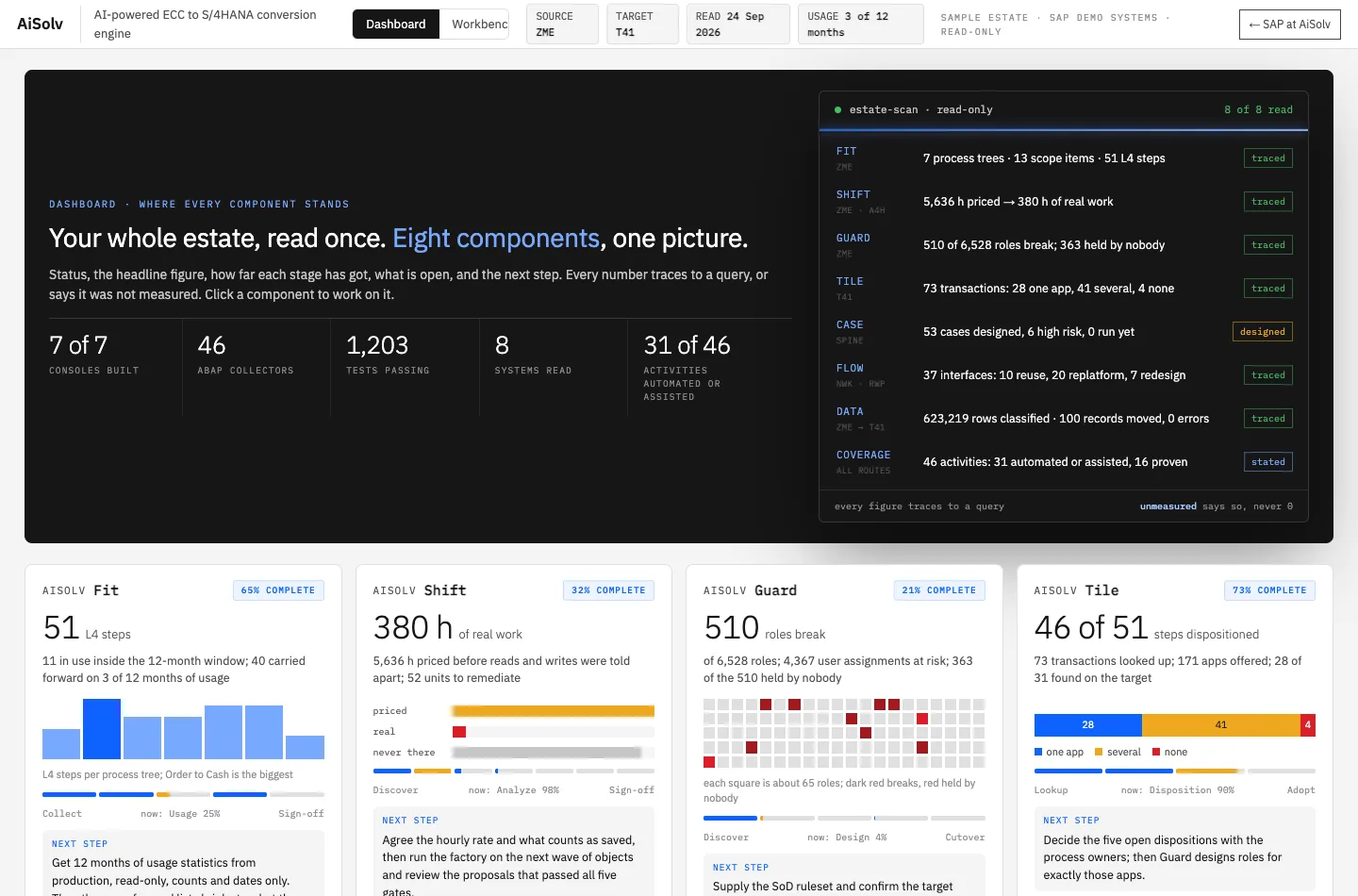
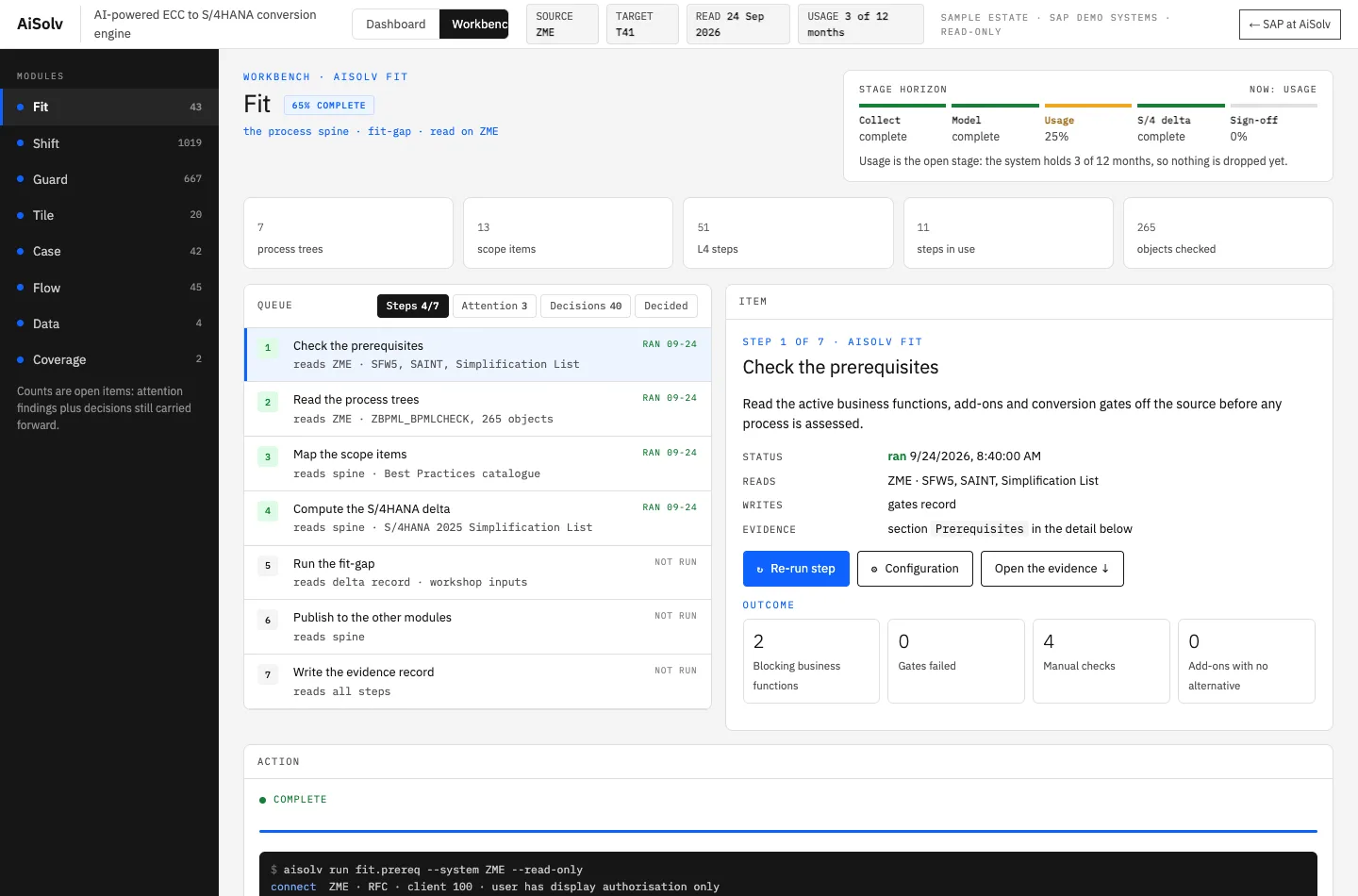
Sample estate: SAP-hosted ECC 6.0 and S/4HANA 2023 systems with SAP’s IDES demo data, plus two SAP PI/PO lab systems. Read-only. No customer data.
05 / HOW IT WORKS
Assess, migrate, validate.
Three steps on one evidence trail.
The agent does the reading and the moving, the console records what was measured, and a person signs. Nothing is left behind without a year of usage or a written decision.
Read and inventory the estate.
- Processes in use, and what changes Fit
- Custom code, roles, apps and interfaces inventoried
- Blockers and gates found before the work starts
- Data classified by domain
Move each piece, module by module.
- Custom code remediated through five gates Shift
- Roles redesigned from delivered templates Guard
- Interfaces moved to Integration Suite Flow
- Records migrated over standard BAPIs Data
Prove it all arrived intact.
- Regression cases run, sandbox to UAT Case
- Authorisation tests on every designed role
- Check tables diffed, records reconciled
- Decisions signed with an owner and a date
06 / GETTING STARTED
Start small.
See your own evidence.
Starting on a sandbox makes the conversation specific to your estate before any wider scope is agreed. Collection is read-only: object names, counts and configuration.
- 01 / PREPARE
Understand the landscape.
A short pre-engagement checklist with your Basis team, and an agreed sandbox scope.
- 02 / DISCOVER
Review real findings.
Run the modules against your sandbox and walk through what each one knows, what it does not, and what it is waiting on.
- 03 / PLAN
Agree the way forward.
The work, the responsibilities on both sides, and the next decisions your conversion needs.
07 / QUESTIONS
What teams ask first.
Does AISOLV run our entire conversion?+
No. Your team or your systems integrator runs the conversion. AISOLV reads the estate, answers the questions that usually get guessed, and keeps the evidence and decisions in one place. Where you want it, the agents also do the moving: code remediation, role design, interface migration and data loads, each behind gates and a named approver.
What do you need from our system?+
Read-only access to a sandbox, agreed with your Basis team. Collection reads object names, counts and configuration. Nothing in your system is changed.
What is the demo running on?+
SAP-hosted ECC 6.0 and S/4HANA 2023 systems loaded with SAP’s IDES demo data, the SAP ABAP Platform Trial, and two SAP PI/PO lab systems. No customer system and no customer data.
Which conversion routes does it cover?+
Brownfield, bluefield and greenfield. The coverage map lists 46 conversion activities, each with its disposition and the route it applies to: 31 automated or assisted today, 16 proven on a real system.
We only need the PI/PO migration. Can we start there?+
Yes. AISOLV Flow stands on its own, works from the standard PI/PO export, and can start on its own. See AISOLV Flow.
SAP ECC → SAP S/4HANASee what your estate says
See what your estate says
before anyone signs a plan.
We open the modules on your sandbox and walk through what each one knows, what it does not, and what it is waiting on.
AiSolv is an SAP PartnerEdge Build partner.